This guide describes how merchants and testers can verify the Swedbank payment flow in the sandbox environment. It focuses on what the payer experiences on the Swedbank payment page, how to simulate different outcomes, and how payment statuses behave during testing.
The new sandbox design makes it easy to replicate any payment result (successful, failed, or cancelled) without needing a real bank account.
When redirected to Swedbank in the test environment, you will see:
- Payment amount and recipient details.
- Buttons or options to simulate different payment results.
- Confirmation screen once a result is chosen.
The sandbox view reflects the same layout as the live Swedbank payment form, but with additional test controls for status simulation.
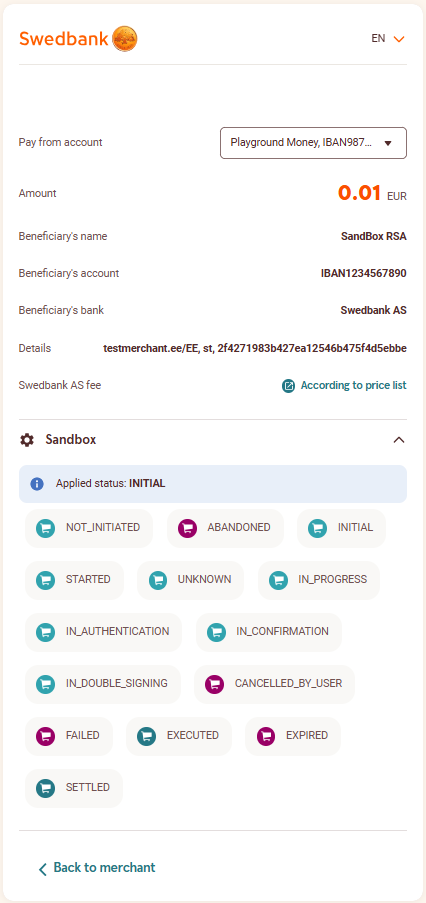
Available Test Statuses
You can select from the following statuses on the Swedbank sandbox payment page:
|
|
|
|
|
|
NOT_INITIATED
|
❌
|
–
|
Transaction request was registered, but the payment is not yet initiated
|
|
ABANDONED
|
✔️
|
❌
|
Payment was not initiated by user within 1 hour
|
|
INITIAL
|
❌
|
–
|
Payment is initiated by user
|
|
STARTED
|
❌
|
–
|
Payment initiation has been started
|
|
IN_PROGRESS
|
❌
|
–
|
Payment initiation is in progress, waiting for final status
|
|
IN_AUTHENTICATION
|
❌
|
–
|
Waiting for user to be authenticated for payment
|
|
IN_CONFIRMATION
|
❌
|
–
|
Waiting for user to confirm the payment initiation
|
|
IN_DOUBLE_SIGNING
|
❌
|
–
|
Transaction requires for second person to confirm
|
|
EXECUTED
|
✔️
|
✔️
|
Successfully initiated payment. Fastest successful status. Payment is not yet settled. Depending on business model can be considered as final.
|
|
SETTLED
|
✔️
|
✔️
|
NEW Successfully settled payment. Some restriction apply. Only applicable for settlement account in Swedbank. Arrives with noticeable delay after EXECUTED. Depending on clearing system and load, usually within an hour.
|
|
FAILED
|
✔️
|
❌
|
Payment initiation failed
|
|
CANCELLED_BY_USER
|
✔️
|
❌
|
Payment initiation cancelled by user
|
|
UNKNOWN
|
❌
|
–
|
Waiting for status to change
|
|
EXPIRED
|
✔️
|
❌
|
Transaction did not receive final status in expected time frame
|
! Once a final status (e.g., EXECUTED or SETTLED) is selected, it cannot be changed back to an earlier state.
Example: A payment marked as SETTLED cannot be reverted to IN_PROGRESS.
Testing Scenarios
|
|
|
|
|
Successful Payment
|
Select EXECUTED or SETTLED
|
Merchant system receives confirmation of successful payment
|
|
Failed Payment
|
Select FAILED
|
Merchant system displays error or failed status
|
|
User Cancelled Payment
|
Select CANCELLED_BY_USER
|
Merchant system receives cancelled notification
|
|
In Progress / Timeout
|
Select IN_PROGRESS and leave uncompleted
|
Payment remains pending in merchant view
|
Status Lifecycle
Typical payment status transition during testing:
INITIAL → IN_PROGRESS → EXECUTED → SETTLED
↘ FAILED
↘ CANCELLED_BY_USER
Notes for Testers
- Each status change on the Swedbank page automatically updates the payment status visible in your merchant portal or EveryPay dashboard
- Please follow logical payment order — do not jump randomly between statuses
- Always finalize the test by selecting a final status (EXECUTED, SETTLED, FAILED, or CANCELLED_BY_USER)
Redirect and Return
After status selection, the Swedbank page will redirect the payer to the merchant’s return URL (same as in live payments).
The result shown there corresponds to the simulated status you selected.